
Planning your spending on free OnlyFans pages starts with one fact: a page with a $0 subscription can still cost you more than a paid page. Free pages earn through pay-per-view messages, tips, and paid extras, not through the subscription itself.

The logic is simple. A paid page charges once, and the platform takes 20% while the creator keeps 80%.
OnlyFans has no built-in discovery feed or directory. That is why ranking sites exist, and it is also why readers often follow several free pages at once.
Why Free Pages Still Cost Money
A free page is defined by price, not by economics. The subscription is set to $0, and the creator earns through pay-per-view messages and tips.
The result is that spending becomes voluntary and repeated. Each unlock looks like a one-off decision. Over a month, those decisions add up to a number that can sit well above a typical paid subscription.
Here are the practical steps, in order, for getting control of that spending:
- Write down every free page you follow before you spend anything this month.
- Set a single weekly amount you are willing to spend across all of them.
- Log every charge the same day it happens, with the page name and amount.
- Review the log at the end of each week against your limit.
- Pause the pages that repeatedly pull you over the limit.
- Reset the same plan at the start of the next month instead of rebuilding it.
The 20% platform fee applies to subscriptions, tips, and pay-per-view alike, so the creator keeps 80% of whatever you send. That does not change your total, but it does explain why creators keep prompting for tips and unlocks.

Track Every Small Charge
Most people remember the big unlocks and forget the small tips. The small ones are exactly where a budget leaks. A tracking habit does not need an app; a notes file works if you use it every day.
Items worth logging on every free page:
- Pay-per-view unlocks, with the exact price shown in the message.
- Tips sent during a chat, including small one-off amounts.
- Paid message requests or reply threads that carry a charge.
- Promotional add-ons such as bundles, discounts, or limited-time offers.
- Repeat unlocks of the same page within one month.
Log the date as well as the amount. Dates reveal whether spending clusters at particular times, such as weekends or late evenings. That pattern is more useful than the total because it tells you when to slow down.
If a page starts to feel like an obligation rather than a choice, that is a signal to pause it. Cancelling a paid subscription stops auto-renew, but existing access lasts until the current paid period ends. On a free page there is nothing to cancel, so the pause has to be a decision you make yourself.

Set a Soft Weekly Limit
A weekly limit is easier to hold than a monthly one because the feedback arrives sooner. A soft limit means you treat it as a target, not a hard rule, and you review it every week. The table below pairs limits with typical free-page spending so readers can see where they sit.
| Weekly limit | What it usually covers | Typical monthly total |
| $5 | A few small tips, no large unlocks | About $20 |
| $10 | Small tips plus one or two unlocks | About $40 |
| $15 | Regular tips and several unlocks | About $60 |
| $25 | Heavy unlocking across multiple pages | About $100 |
Compare the monthly column with a typical paid page at $4.99 to $15. Many readers will find their free-page spending sits above the paid range. That comparison is the whole point of the exercise, and it is the first thing BestOnlyFans readers report noticing.
Tip: put your weekly limit in the same notes file as your spending log. A limit you cannot see is a limit you will not check, and the review takes under two minutes.
Adjust the limit after two weeks rather than after two days. Short-term spikes are normal, but a pattern across two weeks is real information.

Separate Tips From Unlocks
Tips and unlocks look similar on a statement, but they behave differently. Tips are open-ended: you choose the amount, and you can send them repeatedly in one conversation. Unlocks are fixed-price: the price is set by the creator before you decide.
Keep two running totals instead of one. If tips are rising while unlocks stay flat, the issue is conversational spending. If unlocks are rising, the issue is curiosity about paid content, and the fix is to decide before opening.
- Recurring small tips on the pages you follow most often.
- One-off unlocks after a pay-per-view message arrives.
- Occasional larger unlocks during promotional periods.
- Message-based charges that repeat across several weeks.
- Quiet months where you spend nothing at all.
Quiet months matter as much as busy ones. A plan that assumes spending every week will break in the first quiet week, and a broken plan gets abandoned. Build the quiet weeks into the average. For a starting point, top 15 onlyfans earners collects free pages.

Decide Before You Open a Message
Most overspending happens in the ten seconds after a pay-per-view message appears. The price is visible before you unlock, which means the decision can be made before you open anything. Asking a fixed set of questions turns that moment into a routine instead of a reaction.
Questions to ask before tapping into a paid message or unlock request:
- Is this price already inside this week’s limit?
- Have I unlocked this page more than once this month?
- Would I still want this tomorrow at the same price?
- Is this a page I plan to keep following next month?
- If I skip it, what do I lose that I cannot get another way?
If two or more answers point the same way, follow them. There is no penalty for skipping, and no notification is sent to the creator when you decline. BestOnlyFans readers who use this checklist usually find that most unlocks survive the questions, which is fine; the point is that the choice was deliberate.
When a creator raises the subscription price, auto-renew stops and existing access lasts until the current paid period ends. On free pages the equivalent event is a price change on unlocks or messages, which is another reason to log prices rather than only amounts.

Spot the Pages That Pull the Most
Spending rarely spreads evenly. One or two pages usually absorb most of the total while the rest stay near zero. Finding those pages is quick if your log has page names attached to every charge.
Once you know which pages pull the most, you have three options: pause them, keep them but lower the limit, or leave everything else and accept the cost. All three are valid. What fails is leaving the pattern invisible while telling yourself the numbers are small.
Mistakes to avoid when you review the log:
- Counting only unlocks and ignoring tips.
- Judging a page by one week instead of a full month.
- Keeping a page out of habit after you stop reading its messages.
- Raising the weekly limit without a reason.
- Deleting the log at month end instead of rolling it forward.
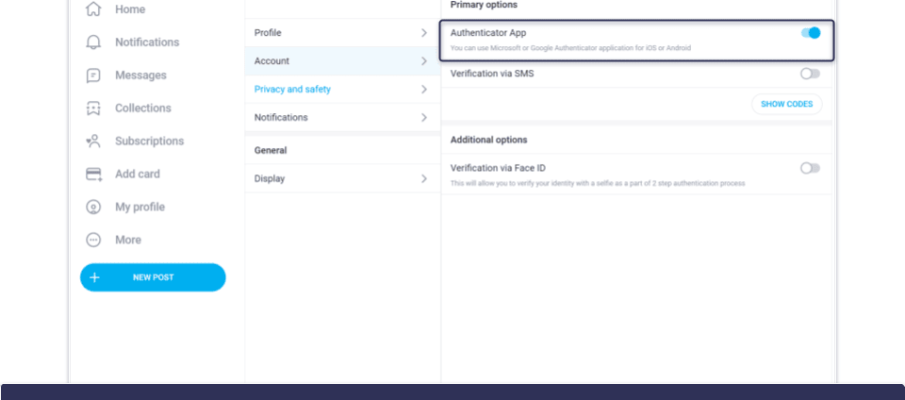
Account settings are also worth a look during this review. Turning on two-step authentication protects the account that holds your payment details, which matters more as the number of pages you follow grows.
Reset the Plan Each Month
The plan should survive from one month to the next without being rebuilt. Rolling last month’s totals forward takes a few minutes and produces a limit that reflects real behavior. The table below shows how that roll-forward works in practice.
| Last month’s total | Next month’s limit | Action |
| Under $20 | Keep the same weekly limit | Change nothing |
| $20 to $40 | Keep the limit, review page list | Pause one page |
| $40 to $70 | Lower the weekly limit | Cut unlocks first |
| Over $70 | Set a new lower limit and log daily | Pause all but two pages |
Two rules keep the reset honest. First, never raise a limit in the same month you exceeded it. Second, carry the page list forward, because the pages themselves are the main variable, not the prices.
Remember that promotional first months may dip below $4.99 on paid pages, while no base price sits below $4.99. Free pages avoid that floor entirely, which is exactly why the limit has to come from you.
Keeping It Sustainable
The plan only works if it bends when your budget tightens. Pause unlocks first, because they are the largest single charges and the easiest to delay. Keep small tips if they are the part you value most, and cut the pages you check least.
If money gets tight, reduce the weekly limit rather than stopping altogether. A very low limit still keeps the logging habit alive, and the habit is what protects you later. Then let the monthly reset do its job and move the number back up only after two calm months.
None of this requires a spreadsheet or an app. It requires a list of pages, a weekly number, and a log you actually update. Done consistently, that routine turns free pages into a predictable cost instead of a slow drain, and it keeps the total below what a paid subscription would have charged. BestOnlyFans refreshes its rankings every month.
FAQ
Do free OnlyFans pages really cost more than paid pages?
They can. The subscription is $0, but tips, pay-per-view unlocks, and paid messages are charged separately, so the monthly total can exceed the typical paid range of $4.99 to $15.
What is the minimum paid subscription price?
The minimum base price is $4.99. Only promotional first months may dip below that figure, and prices run up to $49.99 at the maximum.
How much of my spending does the creator keep?
The platform fee is 20% on subscriptions, tips, and pay-per-view, so the creator keeps 80%. Your total is unchanged either way.
What happens if a creator raises the subscription price?
Auto-renew stops, and existing access lasts until the current paid period ends. Free pages have no renewal, so a price change on unlocks is the event to watch.